Evisa rollout – Action needed by all BRP holders by 31st December 2024.
 TwMC
TwMCEvisa’s are being rolled out in the UK. This guide is for you if you have;
- Leave to remain in the UK, for more than 6 months.
- A BRC/BRP (your card that shows you have leave to remain)
The UK is rolling out e-visas to all BRP holders. This guide contains information for how to get your e-visa account set up, what the scheme is about and where you can go for help.
What is the UK evisa
Evisas are replacing biometric residence permits / cards and other forms of physical proof of your immigration status. E-Visas will allow you to view your status online, and generate codes to share with employers to demonstrate your right to work and others who may need to see proof of status in the UK.
What you need to do
If you currently have a biometric residence permit, then you can make the switch to an evisa. At present it is not available to those who have other physical forms of proof, such as a vignette in your passport, a stamp or other physical proof of status. To check if your document is covered by an e-visa, you can check here.
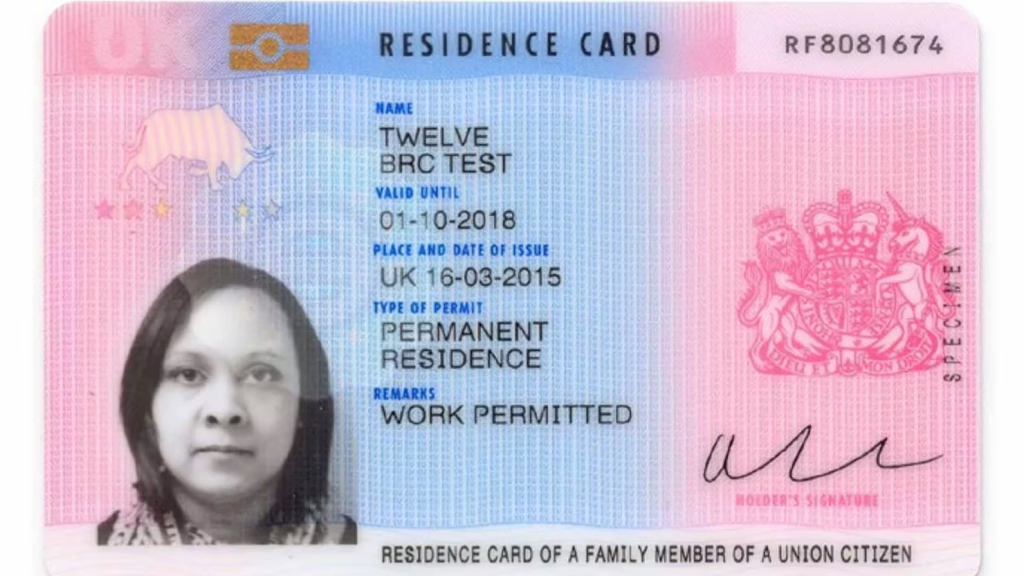
If you have a biometric residence card / permit that proves your status currently, such as like the one above. Then you need to take the following steps;
Setting up a UKVI account – What you will need
- You will need access to the internet, via a phone, laptop or tablet.
- You will need the BRP number in the top right hand corner of your BRP (in the example above the one starting ZR), or if you do not have your BRP/BRC, the application number of the application for your leave to remain.
- You will need either your passport or BRP, as proof of your identity.
- Your date of birth
- Email address
- A mobile phone number
- Access to the UK immigration ID check app. (This has to be on a fairly modern smartphone in order to work)
How to set up an evisa account
- Go to gov.uk/evisa to create a UKVI account and select ‘start now’ and then create an account.
- You will then complete your detailsincluding;
- Your name
- Your date of birth
- Your email address
- Your mobile number
- Your BRP / Application number
- The reference of your identity document.
- You should then receive an email when this is complete that your account has been created.
How to verify for BRP or identity document
- You need to confirm your identity using the UK Immigration ID check app. (To download this app click here for apple and click here for android. You will need to have your BRP/BRC or passport with you.
- There will be a QR code in your UKVI account to scan when you have downloaded the app, using the camera on your device.
- The app, when connected, will ask your to take a picture of your BRP or passport.
- It will then get you to check the details against your document.
- It will then ask you to take a photo of yourself.
You should then return to your UKVI account to complete the registration. You will receive email notifications along the way telling you what you need to do.
Available help and support
For existing Together with Migrant Children young people and families that we are currently working with or have worked with in the past.
Look out for email communications from us. We will be messaging you about what you need to do. We will be running some group workshops walking people through how to access an e-visa and will be also offering 1on1 appointments for those struggling to access their e-visa.
For young people and families where we do not hold an email address – Look out for text messaging as we will be communicating these changes that way too.
For young people and families who we feel may need extra support – You may get a call from one of us to check in and make sure you are able to access your new e-visa.
All help resources for e-visa’s are available here.